Unlock Britain’s Outdoors: 7 Reasons to Choose OS Maps Premium


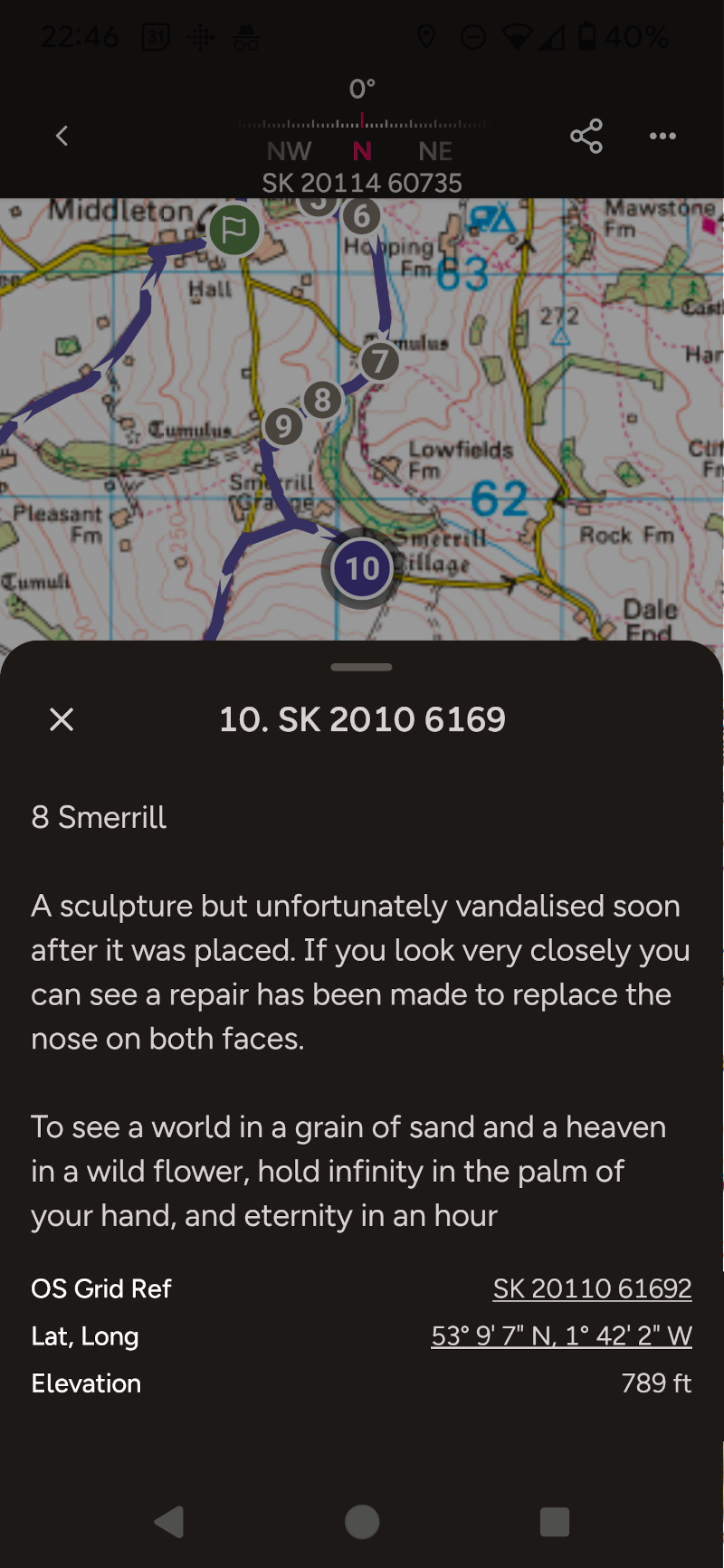
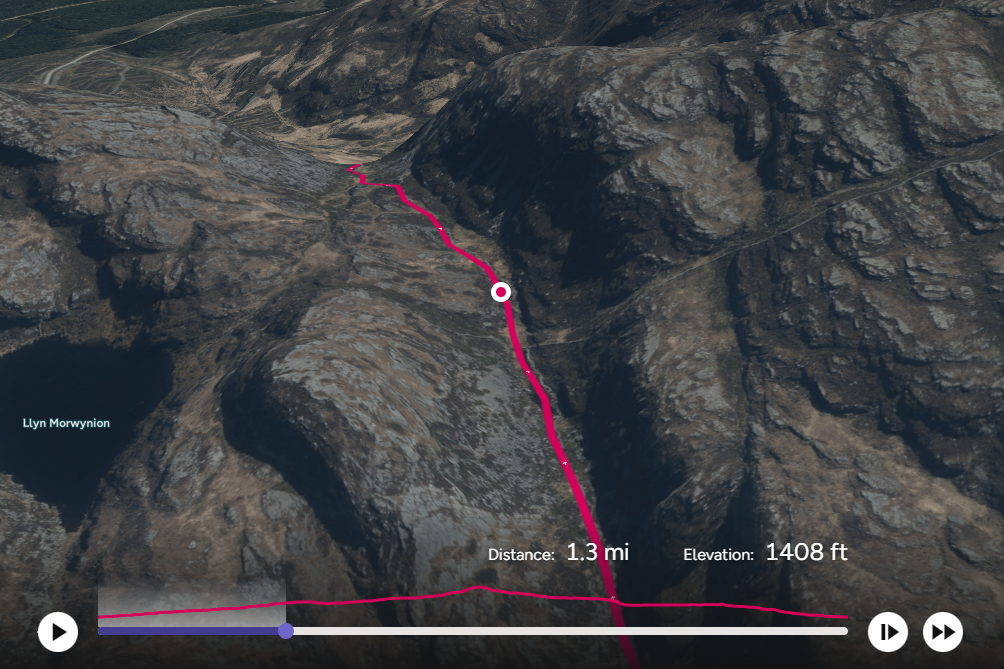
three images showing different featurtes on the OS maps premium

Subscribe to OS Maps App

Navigate Like a Pro: Why OS Maps Premium is a Must-Have for Every Explorer

1 Comprehensive Mapping:

    • Access all 607 OS Explorer and Landranger maps for Great Britain
    • Unlimited viewing, printing, and downloading

2 Offline Accessibility:

    • Download maps and routes for use without a mobile signal
    • Print custom maps as backups

3 Route Discovery and Creation:

    • Explore hundreds of thousands of ready-made routes
    • Create and customize your own paths
    • Global snap-to-path feature for precise routing

4 3D Visualization:

    • Aerial 3D layer for virtual route exploration
    • Scout viewpoints and points of interest before your trip

5 Cross-Device Compatibility:

    • Seamless syncing between desktop, tablet, and mobile
    • Plan on the web, navigate on the go with the app

6 Advanced Features:

    • Offline viewing of purchased maps
    • Import and export routes
    • Print custom A4/A3 maps

7 Global Standard Mapping:

    • Access to OS Standard Mapping worldwide

Bonus: OS Maps is a UK corporation owned by us the British people

For less than the price of just one takeaway coffee per month...

For less than the price of just one cup of takeaway coffee per month, OS Maps Premium offers unparalleled value in my opinion and is one of the best outdoor tools money can buy:

By subscribing to OS Maps Premium, you’re not just buying an app – you’re investing in a comprehensive outdoor navigation tool. It enhances your adventures with detailed maps, route planning, and offline capabilities, ensuring you’re always prepared, whether you’re a casual walker or a serious hiker.

With its affordable price and rich feature set, OS Maps Premium is an essential companion for anyone looking to explore Great Britain’s diverse landscapes safely and confidently.

Subscribe to OS Maps App

a detailed image from OS Maps App showing a waypoint detail

an image showing a map and description in OS Maps App

Compare Prices and Options

the pink os maps App logo with the arrow symbol

Access to PREMIUM with Subscription 

12 Months Subscription: A 12 month recurring subscription works out very much the cheapest at £2.91 per month by paying £34.99 for the whole year.  This is a recurring payment. 

1 Months Subscription: This is £6.99 per month with a recurring payment. This is a recurring payment.


the pink os maps App logo with the arrow symbol

Access to PREMIUM with No Subscription

1 Month Access with no subscription: Still unsure then try the OS Maps Premium for 1 month at £6.99 with a one-time payment on the official OS Maps website. This is not a reoccurring payment. 

12 Month Access with no subscription: Don’t want to get tied into a yearly subscription, no problem. OS Maps App offers 12 months of Access for a one time payment of £39.99 on the OS Maps official website. This is not a reoccurring payment. 


For all options premium will start as soon as payment is made

Prices were correct on 23/07/24 but may have changed. Please check the OS Maps website for the latest prices.

Access or subscriptions can be cancelled at any time

Subscribe to OS Maps App

Comprehensive Mapping

Access all 607 OS Explorer and Landranger maps for Great Britain with ease. Ordnance Survey, the national mapping service, is publicly owned and renowned globally for its expertise in mapping Great Britain. With a long-standing history of producing maps of unparalleled quality and detail, Ordnance Survey remains the gold standard in cartography.

The OS Maps App provides free access to all OS Maps, allowing you to view the entirety of Great Britain on your mobile device. This app also enables you to create and share routes effortlessly.

Alternative options for accessing OS Maps for free include using Bing Maps, which features an OS Maps layer. However, this functionality is limited to laptops and PCs, and is not available on mobile phones. While it is possible to capture a small area using a snip tool or screenshot and print it out for manual route planning, it does not offer the convenience and comprehensive accessibility of having the maps readily available on your mobile device.

Available Offline


With the OS Maps app, you have free access to the entirety of Great Britain at your fingertips. The app allows you to create your own routes and explore thousands of routes created by others at no cost. However, downloading or printing maps and routes requires a subscription, which is essential when venturing into areas with no mobile signal.

An OS Maps Premium subscription provides unlimited viewing, printing, and downloading capabilities, ensuring you are always prepared, even in areas without mobile coverage. Before heading into the countryside or wilderness, you can print a paper copy and download your map and route to your phone. This guarantees that you will always have access to your maps and routes, providing peace of mind and security during your adventures.

Route Creation and Discovery

The OS Map App offers an extensive repository of pre-existing routes, complemented by the capability for users to create new bespoke routes.

The app hosts a vast array of pre-configured routes, each meticulously detailed with crucial metrics such as estimated duration, distance, and elevation profiles. These data points provide users with invaluable insights for journey planning and difficulty assessment.

For those seeking a more personalized experience, the app facilitates custom route design. While this feature is available to all users, the premium tier enhances functionality with the inclusion of the “snap to path” tool. This advanced feature significantly improves route accuracy and usability.

The app’s search functionality allows for efficient route discovery. Users can input specific destinations to access a list of relevant routes. Further refinement is possible through an array of filters, including:

Difficulty level
Distance
Duration
Route type (circular or linear)
Activity category

Additionally, users have the option to toggle between all available routes and those specifically recommended by verified, trusted partners. Disabling the recommended filter expands the pool of available routes, offering a more comprehensive selection.
This sophisticated system of route management and discovery ensures that users of all experience levels can efficiently locate or create routes that align with their specific requirements and preferences.

3D Visualisation

a map showing the moutains with a 3d fly through OS maps route going through them

Accurately gauging a route’s topography can be challenging, as user ratings may not always provide a comprehensive representation of a path’s true nature. The 3D Fly-Through feature in OS Maps Premium serves as an invaluable tool for pre-expedition reconnaissance.

This advanced functionality enables users to conduct a virtual survey of their intended route, offering a nuanced understanding of the terrain’s characteristics. It provides critical insights into the route’s elevation profile, allowing hikers to anticipate steep ascents or descents. Furthermore, it helps identify potential viewpoints and vantage spots, or conversely, highlights sections where visibility might be limited due to topographical constraints such as valleys or gullies.

Cross-Device Compatibility

Seamless Syncing Across All Devices

Experience unparalleled convenience with OS Maps’ cross-device compatibility. Whether you’re planning your next adventure on a desktop, navigating trails on your mobile phone, or checking your route on a tablet or smartwatch, OS Maps ensures a seamless transition between devices.

Plan on the Web, Navigate on the Go

With OS Maps, you can effortlessly plan detailed routes on your desktop or tablet. Once your route is set, it syncs automatically, allowing you to follow along on your mobile device when you’re out exploring. This feature ensures that your planned routes are always accessible, no matter where you are.

Available on Multiple Platforms

  • Desktop: Perfect for detailed route planning and extensive map exploration.
  • Mobile: Ideal for on-the-go navigation and real-time tracking.
  • Tablet: Combines the benefits of both desktop and mobile, offering a larger screen for planning and portability for navigation.
  • Smartwatch: Provides quick access to essential route information and directions.

Easy Access and Download

Download the OS Maps app from the Apple App Store for iOS devices or Google Play for Android devices. Enjoy the flexibility of viewing and editing your maps and routes across all your devices with seamless syncing.

Subscription Benefits

While the OS Maps app offers free access to create and use routes, an OS Maps subscription unlocks additional features. Subscribers enjoy unlimited viewing, printing, and downloading of maps and routes. This is crucial for adventurers heading into areas with no mobile signal, ensuring you always have a reliable backup.

Always Be Prepared

Before heading out, print a paper copy and download your map and route to your mobile device. This guarantees that even in remote areas, you will have access to your maps and routes, providing peace of mind and enhancing your outdoor experience.

Embrace the full potential of OS Maps and enjoy the convenience and security of cross-device compatibility for all your outdoor adventures.

Subscribe to OS Maps App

Download Purchased Maps

For those people who prefer the reliability of paper maps, OS Maps offers a seamless integration of physical and digital mapping tools. Ordnance Survey renowned orange Explorer maps, the only maps of Great Britain that display detailed footpaths, car parks, contour lines, campsites, pubs, and more, can now be purchased and downloaded directly to the OS Maps app.

Every Explorer map purchase includes a complimentary digital download, ensuring that you always know your location, whether you’re walking, running, cycling, or horse riding. This feature enhances your outdoor experience by providing the flexibility and convenience of accessing detailed maps on your mobile device, even in areas without mobile signal.

Redeeming your paper map in the OS Maps app is straightforward. Simply enter the 12-character code found in the scratch-box on your paper map to add it to your digital library. Once redeemed, you can view and download all your maps from the Paper Maps section within the app.

With the OS Maps app, you can easily download pre-purchased maps directly to your device. This ensures that your essential mapping tools are always at your fingertips, ready to guide you on your adventures. The convenience of offline viewing means you can explore the great outdoors with confidence, knowing that your detailed and reliable OS Maps are always accessible.

Experience the best of both worlds by combining the tactile assurance of paper maps with the digital convenience of the OS Maps app, enhancing your ability to navigate and explore Great Britain with precision and ease.

Enhance Your Outdoor Adventures with OS Maps: Track and Record Your Routes

With OS Maps, tracking, recording, and logging your activities has never been easier. Whether you’re following a predefined route or simply exploring, you can privately save your activities and keep a detailed log of where you’ve been, how far you’ve traveled, and how fast you’ve moved. The latest OS Maps update makes it seamless to record and track your routes, aligning with the popular adage, “If you didn’t track it, it didn’t happen.”

For walkers, runners, cyclists, and outdoor enthusiasts, tracking activities is second nature. It helps you measure distance and speed, map out various places, and maintain a personal log of your adventures. OS Maps has revamped its activity tracking feature for a more intuitive experience, allowing you to see your activity history, stats for distance, speed, and elevation, add useful notes, and create routes from your favorite activities.

Fancy an aimless ramble with no set plan? With a few taps, OS Maps can track your activity, and upon returning home, you’ll know exactly where you’ve been and how far you went. You can then save this activity as a route to follow again or share with friends.

Take your experience to the next level by using OS Maps on the web to relive your adventure with a stunning 3D fly-through. Even if you’re not focused on the numbers, maintaining an activity log can be a powerful motivational tool. Whether you have a specific goal, such as a weekly or monthly distance target, the ability to track your progress will keep you on course.

The OS Maps My Activities dashboard offers a customizable snapshot of your activity history over different periods. It provides inspiration for new places to explore, helps you stay on track during your adventures, and ensures you maintain that crucial log to achieve your goals, like the Walk1000Miles or Run1000Miles challenges.

Subscribe to OS Maps App

Understanding GPX Format and Its Integration with the OS Maps App

The GPX (GPS Exchange Format) file is a widely used electronic format designed for sharing GPS data. It contains a series of GPS locations that form a route, making it an essential tool for hikers, bikers, and outdoor enthusiasts. GPX files are known for their versatility and compatibility, serving as the most popular means of saving and exchanging hiking and biking routes.

As an open standard, the GPX format can be used on any device, free of charge, regardless of the brand. This universality ensures that users can easily share and access routes across different platforms and devices, including smartphones and bike-mounted GPS devices. A typical GPX file consists of a list of points, or coordinates, that outline a route for easy navigation.

GPX files are integral to the functionality of many GPS devices, such as those from Garmin or SatMap, as well as various mapping software applications. These files contain longitude and latitude data, which may include waypoints, geocaches, routes, and tracks. Because GPX files are saved in XML format, they can be easily imported and read by numerous mapping programs and web services.

The OS Maps app used with an OS Maps Premium account, developed by Ordnance Survey, seamlessly integrates with GPX files, enhancing the user experience by allowing for straightforward import and navigation of routes. Users can import GPX files into the app to view detailed routes, ensuring they can navigate with precision and confidence. The app supports creating and sharing routes, waypoints, and tracks, making it a powerful tool for outdoor adventure planning.

Additionally, GPX files are compatible with a variety of other applications, including Garmin’s Basecamp software, Explore & Connect Apps, GPS Training’s OS Planner software, ViewRanger App, Google Earth, and more. This widespread compatibility allows users to easily exchange GPS data and access a wealth of navigational resources.

In summary, the GPX format’s ease of use and broad compatibility make it an indispensable tool for anyone involved in outdoor activities. The OS Maps app leverages this format to provide users with reliable, detailed route planning and navigation capabilities, ensuring a smooth and enjoyable outdoor experience.

Subscribe to OS Maps App

Camping Secrets - Outdoor Guides and Reviews
Logo